Showing posts with label Product Reviews. Show all posts

Friday, June 14, 2013

Book Review: Viper Pilot by Dan Hampton

Longtime blog readers may have noticed I haven't reviewed a book on here in a long time - over 2 1/2 years, to be precise. I just don't have the time to read nearly as much as I'd like to. So I very much enjoyed being able to plow through Viper Pilot: A Memoir of Air Combat by Dan Hampton last month. To cut straight to the point... it's an awesome, compelling read.

Lt. Col. Hampton flew F-16s in the US Air Force for 20 years. He saw combat in both Desert Storm and Operation Iraqi Freedom. As a member of the infamous Wild Weasels, it was his job to fly in first, attract the enemy's attention, avoid getting shot down, and destroy their air defense systems. The book covers his entire career in gripping detail - from initial training through deployments to, finally, retirement.


Perhaps the strongest praise I can bestow is also the most general - and that is that I absolutely love Lt. Col. Hampton's style of writing. It was detailed, wonderfully so, to the point that I maintained a constant mental picture as I read. I pictured myself in the cockpit of his F-16 and could envision the SAMs streaking up into the sky from the drab desert terrain. Yet it was also so well-explained and nuanced that you were never confused by what you were reading. He perfectly threads the fine line between legible-to-the-layman and total-fighter-pilot-speak.

The stories themselves are great, full of detail and accurate, true-to-form dialogue. Which is to say all the language is decidedly not PG. But it shouldn't be. It reads just like the words you'd expect to hear coming out of a fighter pilot's mouth. I loved it. A brief sample...

"The problem with a hole in the clouds was that everything on the ground that could shoot was generally aimed up through the hole. Waiting. Waiting for some fighter pilot with more balls than brains to try and sneak down through it. A sucker.
[sic] 
"Everyone in Baghdad was awake now and looking up at the two American fighter jets who were insane enough to come down low over their capital city and basically flip the bird to every SAM and anti-aircraft gun on the ground. I think it really pissed them off. 
"Down...down...down. The fighter was shuddering from the speed and the weight of the cluster bombs under my wings. Five hundred and twenty knots now... 600 miles per hour. What a way to spend a birthday. Today I was thirty-nine, and I'd really rather be on a beach with a pitcher of margaritas."

Beyond the words themselves, every story is very well-formed and completely engrossing. From simple training exercises to losing an engine (the only engine, mind you) on takeoff to the throes of near-death combat, every one drew me in to the point that I couldn't put the book down until the end of the chapter. And then I still wanted to keep reading.

If you enjoy military aviation or just like a good ol' flying story... then I think this is a great book for you. The writing is detailed, biting, hilarious at times, and altogether excellent. It's a perfect match for the amazing stories that come from twenty years' experience in the cockpit of an F-16. If you're looking for an entertaining, captivating read I highly recommend Viper Pilot.

Rating: 5/5 Cubs


Full disclosure - I was contacted by the publisher last summer and was offered a free review copy of the book. All thoughts and opinions are 100% my own.

If you decide to purchase this book based upon my review, I would appreciate if you do so by clicking on one of the Amazon links in this post. It really helps support the blog. Thanks! -Steve

Saturday, March 9, 2013

Android App Review: Avare

Although I've used a variety of aviation apps on my phone over the past couple years, I haven't reviewed one until now. I suppose the reason is two-fold. First, it honestly didn't really cross my mind. Second, and more accurately, I haven't used anything that so useful it made me say, "I need to tell people about this!" until now.

Avare (pronounced "Av-Air") is a free, feature-rich app on the Android platform. It offers moving map functionality with free downloads of Terminal Area, Sectional, IFR Low Level, and World Aeronautical charts plus Airport/Facility Directory information and more.

I first installed Avare a couple months ago and was immediately taken by just how much functionality was available in a free app. Fast-forward to last month and I finally was able to use the app extensively in-flight. That trip forms the basis for this review.

Avare in use on our trip to Evansville last month

Hardware
  • Motorola Droid 2 Global smartphone (Verizon)
  • OS: Android 2.3.4 (Gingerbread)

Features
  • Charts stored locally; no data connection required to use the app
  • Airport/Facility Directory information available for all airports
  • Charts available - Sectionals, Terminal Area, IFR Low Enroute, WAC, Terminal Procedures, and Airport Diagrams
  • GPS track line to destination, bearing, ground speed, time enroute, and altitude readout
  • GPS position overlay on Airport Diagrams when taxiing
  • Track or North Up, Landscape or Portrait
  • METAR/TAF information displayed over airports on charts (with a data connection)
  • TFRs displayed graphically and in text form
  • Press for quick distance/bearing/direction from any point on the map relative to your current position
  • Nearest airport list

Installation/Data Download

Since it's free, just go to the Google Play Store and install. That's it! Then, download whatever data/charts you will be using. I love that Avare allows you to specify exactly which content you want - down to individual charts. This saves storage space but also makes it easy to determine if you have the necessary coverage for a given trip. The flip side of that, and my only gripe, is that the download process can take a while since the files are large; you'll want to do this over Wi-Fi.

Personally, I install the Cincinnati/Detroit/St. Louis/Chicago Sectionals and the IFR Low Enroute charts covering the same region. Dayton is smack-dab at the corner where those meet up, so I can fly a good distance in any direction and remain covered. I should also note that everyone must download the primary database (which includes the A/FD data) in order to use the app.

Airport/Facility Directory information for EVV 

Usage

There are very few buttons on-screen; everything is accomplished within a few small menus or press-hold actions. This is a very good thing. Avare is not a distraction in the cockpit.

Getting started is very simple. Click the Menu button (bottom-left of the screen) and select Destination, enter your airport identifier, click on the airport name, and you're navigating direct-to. It really is that simple. Beyond that, all recently used airports pop up immediately when you go to the Destination screen. I found this exceedingly helpful on our trip; I entered EVV, IMS - our fuel stop, and 40I before takeoff. That meant no typing in flight; all the airports I needed were waiting for me whenever I went to the Destination screen.

Once you're flying, your current bearing, ground speed, distance to destination, and ground track to destination are all displayed at the top of the screen. At times, I wished the green font was slightly more legible (or there was an option to pick your own text color) but the data is presented in a clear, concise manner.

If you have extended runway centerlines turned on, they appear with runway numbers once your destination is on-screen. This proved very valuable on approach to EVV when I initially lined up with Runway 22 after being cleared to land on Runway 18. I knew something didn't look right and confirmed the error with the plane's compass. However, a quick cross-check with Avare was a helpful confirmation of our position.

Approaching EVV with extended runway centerlines enabled

Once on the ground, one of Avare's best features rivals that of its infinitely more expensive competitors - GPS position overlay on the Airport Diagram! This was handy at EVV and could be a godsend at an airport with a complicated maze of taxiways. Obviously you shouldn't count on it as your only source of data, but there's no denying it greatly enhances your situational awareness. Did I mention this is free yet?

Airport Diagram (GPS position overlay works on the ground!)

Note that the terminal procedures and approach charts are not geo-referenced in any way; your current position cannot be overlaid on them. I assume this is for legal/liability reasons but it's certainly not an issue for me as a VFR pilot. Regardless, it's worth noting.

There are some other handy features, including color-coded METAR/TAF overlays on the map screen when a data connection is available. Another favorite is what I'll call the "current position" cheat. Basically, press-hold on any object/point on the chart, and your current distance, bearing, and direction to that point are displayed at the top of the screen.

This is very helpful for radio calls. Instead of an educated guess when calling ATC, imagine a simple press-hold on the nearest airport and being able to say, "Cincinnati Approach, Skyhawk 2814L is 8 miles NE of Madison County Airport, two-thousand climbing five-thousand five-hundred..." Although I haven't really put it to use myself yet, I think this is a great function.

Final Thoughts

Beyond the existing functionality, I'd be remiss if I didn't note how responsive the developers are. There are frequent updates - more than once per week. Requested features are added on a regular basis and bugs are quickly fixed. Software development can be a thankless job but these guys deserve all the praise sent their way. I'm sure they'd appreciate your donations, too.

Normally I may have deducted a star for my minor gripes, but I also realize I'm using the app on a small phone screen. If I owned - and was using this on - a tablet, I think those minor annoyances would disappear. So when you factor in the price and functionality I really can't say Avare has any serious faults. Put simply, it's not perfect, but it's darn close.

For more information, check out the official website.

Rating: 5/5 Cubs

Wednesday, October 19, 2011

A guide to creating flying videos

April 2013 Update - Since this was posted, I've made a few changes. Instead of the complicated intercom setup I now use an intercom recording cable; it was about $35 and works great. Software-wise, I think I have settled on using Adobe Premiere Elements 11. It has more than enough features for what I do and is a fraction of the cost of Premiere Pro CS6. I'll likely write a detailed update post about all this once I've learned the software a bit more thoroughly.


I first want to thank readers Jeff and Brent, who emailed asking about my video setup earlier this summer. Their requests really sparked my desire to write this post. Inquiries about my camera and videos come in semi-frequently and writing about my process in detail is a nice piece of content to add to the blog. Sorry it has taken so long (you all know about the wedding, now only a month away!) but I'm glad to finally be posting this.

It would be misleading for me to begin without first mentioning that there are some caveats and weak links in my current setup. So for those of you starting from scratch, please note the equipment I recommend at the end of this post. Some of what I currently have works very well but there are other areas where I plan to upgrade or change my approach but simply have not yet had an opportunity.

My Equipment
Introduction

The best thing I can probably do is talk a little bit about my equipment, why I bought it, and what purpose it serves. So here goes...

We're talking about creating videos here, so the video camera is obviously a key element in the process. I purchased a Kodak Zi8 a little over two years ago for two primary reasons. First, I work for Kodak and the employee discount was nice. Second, and more importantly, it has an external mic input that allows me to hook it into the intercom to capture audio. It records in 720p or 1080p HD (I always use 720p / 30 fps) and the quality is more than sufficient for my sharing vehicle of choice, YouTube. Nearly all my flying is during the day so any low-light performance issues don't concern me. I'm not sure that any device in the pocket video camera segment has great low-light performance, so keep that in mind if you want to record at night.

Kodak Zi8 with RAM attachment in the tripod mount

I purchased a portable intercom through the AOPA Classifieds a few years ago. It was mainly because the 172 at Stewart only has a two-place intercom in the panel and I wanted to be able to talk to everyone when flying with more than one passenger. However, it also has an audio out jack that has become quite handy for piping intercom and radio chatter into the Zi8.

Sigtronics SPO-42 Portable Intercom with cable in "Audio Out" jack

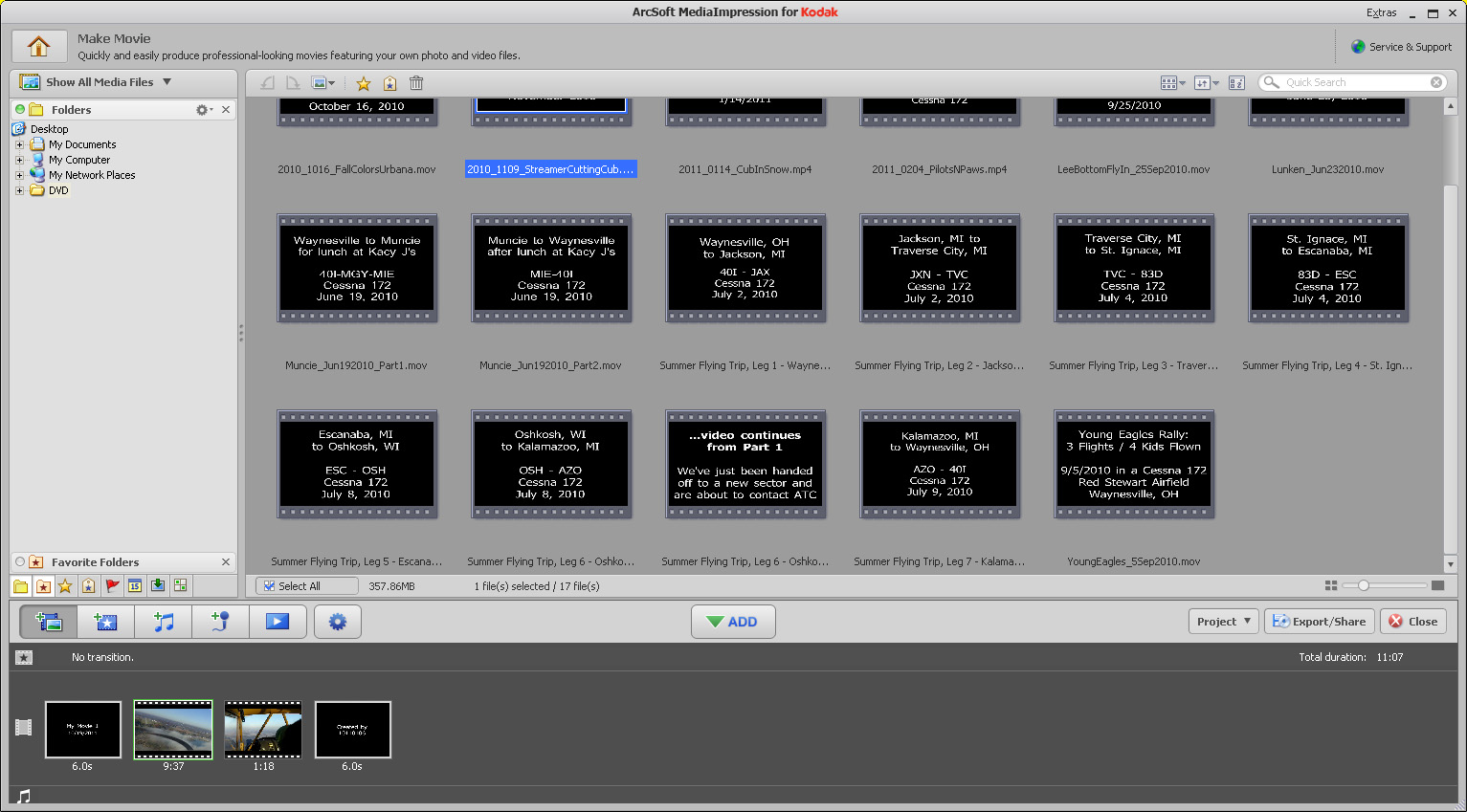
Video editing software is an area where I'm currently just making do with what I have. I don't want to buy anything because I need a new computer and have not decided whether to get an iMac or a Windows machine. The MediaImpression software that comes with the Kodak cameras has been perfectly adequate - after all, every video of mine from the past two years has been edited in it - but some things that should be simple tend to be a time-consuming hassle. If you want to save yourself headaches or aren't familiar with video editing (which I am, and that's partially why I've continued to work around MediaImpression's limitations) I'd definitely recommend better software from the get-go.

Setup & Mounting

There are two setups I generally use, depending on the type of airplane. In the Cessnas, I attach the RAM Suction Mount to the side of the windshield to the left of the pilot. In the Cub, I often attach a RAM Yoke Mount to the tubing inside at the top of the cockpit. The camera hangs upside-down when I use that approach in the Cub, but it's simple to rotate the video 180 degrees in the editing software.

Fully-mounted camera in the 150

 View of the camera mount from the outside of the airplane

My main reason for doing things differently in the Cub is that I usually fly it with the door open. Mounting the camera further back with the suction mount places it in the blast of wind flowing through the open door. No matter how secure the mount is, that results in way too much vibration and buffering to produce a clean video.

RAM Yoke Mount and camera simulating the Cub mounting position

In either case, a RAM Long Arm attaches to the mount and I attach a RAM Tripod Mount to the other end of the arm. This allows full freedom of movement so I can position and rotate the camera to properly frame the desired field of view. I can't heap anything but praise on the RAM Mounts. They are incredibly sturdy and dissipate vibration quite well.

For the past year or so I've been using a Fisheye Lens adapter on the camera. It really expands the field of view, giving a sense of the peripheral sight picture that's so important when we're up there flying airplanes. A small magnetic ring is permanently adhered around the Zi8's lens and I just attach the lens to it every time I set things up in the airplane.

One final setup check, and this is important with the Zi8, is to ensure the Electronic Image Stabilization (EIS) feature on the camera is OFF. I can't give you the exact technical reason, but something with mounting the camera in a fixed position facing the rotating propeller causes what I'll call a "porpoise effect" that is extremely visible and annoying on the recorded video. With the EIS turned off, everything looks great. So watch out for that!

You can see the Fisheye Lens protruding from front of the camera

If I want to capture audio, my current equipment dictates I have to use the portable intercom. Since we rarely wear headsets in the Cub, I don't ever capture intercom audio. Instead I simply allow the camera's built-in mic to record ambient cockpit noise. In the Cessnas, I'll plug the intercom into either the pilot or co-pilot's position. The 3.5 mm stereo audio cable then runs from the intercom up to the camera. Depending on how I hook things up, it may run up the panel and across the glareshield or just up the left side of the airplane. Regardless, the most important thing is that you always ensure the audio cable is free of all controls and will remain securely in place in flight.

Portable intercom and audio cable in a 150


Running the audio cable across the glareshield


Video Editing

I'm not going to go into great detail about what I do in the editing process, mainly because everyone has their own way of doing things. What footage you cut, keep, and change around is really your own call when it comes to making a video. Same goes with adding captions and music. Experiment on your own and have some fun!

Still, I do tend to follow a few general considerations and methods:
  • Trim out repetitive footage - cornfields all look the same after a while!
  • Speed up the footage to shorten the playback (I've been doing this a lot lately)
  • Adjust the length of clips to match music tracks
  • Label airports where I'm taking off and landing at with captions
  • Be mindful of overall video length, especially as it relates to YouTube's limits
  • Mute the recorded cockpit/intercom audio when it's distracting or choppy
  • Use crossfade transitions between all clips

The main Make Movie screen in MediaImpression - timeline is at the bottom

Video editing window - you can adjust the start and end with the sliders

Example of inserting a caption into a video clip

Selecting the Cross Fade transition (double-click on it to add it to the movie)

As far as music goes, for the longest time I used instrumental jazz playing softly in the background. The reason for this is quite simple - when I have intercom audio in the video, any music with lyrics tends to become distracting very quickly. Nearly all those songs came from All About Jazz, an awesome site I highly recommend because it has a ton of free downloads. However, I've been recording a lot less intercom audio lately (mainly because I'm not happy with the quality coming out of my current setup) and have used more traditional songs in conjunction with sped-up video footage.

I have only added a voice-over to a video one time, when I commented on flying kids at a Young Eagles rally last fall. It's a great tool if you want to explain something that won't fit in a short caption. Definitely something for you to keep in mind if it fits your own videos.

When the video is complete, I save it out of MediaImpression in .mp4 format using the highest bit rate available. That option is under the Save to PC button in the software. There is an ability to send your video straight to YouTube but I prefer to save it locally first so I have a copy archived for backup purposes. Once it's saved to your computer, just upload it to YouTube and it's out there for the world to see!

Recommended Equipment
Final Thoughts

Take a look at the list above, which basically shows what I would prefer to use in lieu of my MediaImpression software and portable intercom. If you're starting fresh and want the best quality videos you would be wise to consider these upgrades. That said, you've seen me produce pretty decent videos for over two years using my current setup so those products certainly aren't necessities.

There's no way around the fact that it takes some time to do all this - especially in the editing process, and especially if you're picky about the final result and want everything fit together just perfect. Once I start I tend not to stop until I feel it's finished - and that can mean many hours in front of the computer, sometimes late into the night. I think the end result is worth the time but you can probably now see why I post about plenty of flights sans video... if I know I won't have the time to edit, I don't even hook the equipment up.

Thanks again to you readers for inspiring this post. It's probably a lot longer and more detailed than you asked for but I wanted to cover all the bases. I really hope this gives you a good idea of how I capture video and audio, piece it all together, and form a somewhat coherent movie when all's said and done!

Monday, November 22, 2010

Pilot Toys: Serengeti Velocity Aviator Sunglasses

Everyone knows that you're not a cool pilot without awesome pilot sunglasses, right? Ok so that might be a bit of a stretch but it is important to have a good pair when flying high in the sky. My eyes have always been sensitive to sunlight and I consider a good pair of sunglasses absolutely essential both on the road and in the air.

I have a knack for losing two things - sunglasses and winter gloves. Seriously, I've been through more black leather gloves in my life than the suspects in the OJ Simpson murder investigation. Accordingly, I was quite apprehensive about buying an expensive pair of sunglasses even though I knew it was a very worthwhile investment as a pilot. Logic won out and I bought myself a pair of Serengeti Velocity Titanium aviator sunglasses with Drivers Gradient lenses for about $100 in August 2009.


Compared to the sunglasses most folks are used to, which come with polycarbonate lenses, these sit a bit heavier as the lenses are all-glass. It's not a problem for me personally but it is something worth noting; I'd recommend you try them on for at least 10-15 minutes before deciding if they are for you. I think the glass lenses provide more clarity than any other pair of sunglasses I've ever owned.

The Drivers Gradient lenses provide an astoundingly clear picture. They are a brown/amber tint that gets darker as you move from bottom to top. This is great both in the car and in an airplane because it allows you to see the dashboard or instrument panel on cloudy days or other times when it's not as bright out. I think the lenses cut through haze incredibly well and I'll often leave mine on until the sun has gone below the horizon. This is a great example of when the gradient tint allows me to see everything on the instrument panel while still providing that haze-cutting view outside.

The one knock I have against them is durability. I have been extremely careful with my pair (note my initial comment about losing sunglasses - this is quite an achievement!) and the left lens still managed to pop out last week. I went to push it back into place and realized one of the screws holding the frame together had fallen out. Whether it simply came loose or the threads became stripped I do not know. I contacted Serengeti (through their parent company, Bushnell) to ask for a replacement screw and the told me I would have to mail in my sunglasses. That seems a bit silly and expensive to me - just sending me a tiny screw (I'd happily pay postage!) has to be easier. Thankfully, the guy working at our local Sunglass Hut this evening understood great customer service and repaired my aviators for free!

I am quite pleased with these sunglasses after over a year of ownership. Without question, they increase my ability to spot landmarks on the ground and other airplanes in the sky. I love the color of the lenses and their ability to cut through haze and improve visibility. The durability issue is the reason I'm not going to give these a perfect rating but I still recommend them - just be sure to handle and store yours carefully!


Rating: 4/5 Cubs


If you decide to purchase these sunglasses based upon my review, I would appreciate if you do so by clicking on an Amazon link in this post. It really helps support the blog. Thanks! -Steve

Saturday, November 13, 2010

VFR Communications from Sporty's

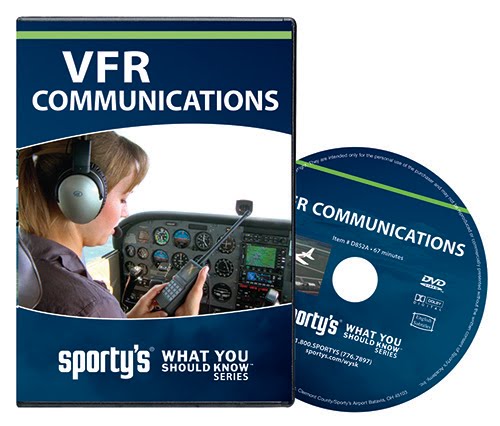
Last week I received a free review copy of Sporty's newest instructional DVD in their "What You Should Know™ Series, VFR Communications. The DVD was completely updated in September 2010. It is available from Sporty's and costs $34.95. The program is also available as a video download, also priced at $34.95.

I'm glad to have the opportunity to review this DVD, as I purchased the previous version of their VFR Communications program last year. That older version was not something I would have highly recommended. Content was somewhat limited in my opinion; it consisted mainly of short in-flight video segments of a pilot in various airspace classes without very detailed explanations. Consequently, I loaded the new DVD into my player with tempered expectations but hoping for a much-improved product.

Menu navigation is well thought-out. The main menu presents eight sections - Introduction, Non-Tower Field, En Route, Non-Standard Communications, Class D, Class C, Class B, and Communication Failures. When you click on a section, a sub-menu opens up with a short description of what content is inside and a button to play the video. As with most Sporty's instructional videos, narration is done by popular airshow announcer and pilot Rob Reider.

The video begins with an introductory chapter that does a great job of covering the basics needed for content in later chapters. Both the Aeronautical Information Manual (AIM) and Pilot/Controller Glossary are referenced as important places to find proper phraseology. The phonetic alphabet is explained and that leads into numerous examples of pronunciation - altitudes, call signs, magnetic headings, speeds, etc. I think this is critical information that reduces confusion for someone new to the language of aviation and am glad Sporty's chose to dedicate the introduction to it.

Screenshot from Chapter 1 - Introduction / General Information

Following the introduction, the video moves right into non-towered fields. I particularly liked how they have a recorded AWOS broadcast and supplemented the audio with a text transcription on screen. It seems like it would be very useful for a new student to hear both the sound and pace of an automated weather station before climbing into an airplane. The video also makes use of many helpful graphics and visualizations of the aircraft's location during various radio calls - especially in the pattern.

Communications with Flight Service (regarding VFR flight plans) and Flight Watch (regarding in-flight weather) are each given a couple minutes of good explanation in the En Route portion of the program. The simulated radar animations of an airplane's track superimposed on a VFR Sectional chart do a very nice job illustrating the usefulness of VFR Advisories, also known as Flight Following. I also thought the short segment pointing out locations where a pilot can find the proper radio frequency to call ATC for Flight Following was very well done.

The sections on airspace (Class B, C, and D) are all structured similarly. The airspace itself is first given a brief explanation and then a flight into and out of the airspace is simulated along with all requisite communication. All the radio calls appear to be simulated and the rate of speech is noticeably slowed compared to what you'll usually hear when talking with ATC. This is good for student pilots trying to learn proper communication but I do feel that it lends a slightly unrealistic tone the video.

Graphics overlaid on top of VFR Sectional charts are again used heavily and to good effect. However, I do take issue with the lack of in-flight video. The previous version of VFR Communications was chock full of in-flight video at the expense of graphics and explanations. This version tilts heavily the other direction - too far in my opinion. I think Sporty's needs to strike a better balance between in-flight video with actual radio calls and animations and graphics used to illustrate the process.

Screenshot from Chapter 7 - Class B Airspace

Even though the video covers proper radio phraseology, I really appreciate the fact they it also spend a few minutes covering non-standard communications. Lord knows every pilot has heard all sorts of gibberish over the radio before; I think it's important to expose new pilots to both the good and the bad! Similarly, a bit of explanation of Instrument procedures helps clarify what the folks out practicing approaches are talking about. While on this topic I should mention that I found it somewhat peculiar that every example in which ATC calls out traffic and the airplane does not have it in sight has the pilot saying "looking for the traffic" whereas the proper response is "negative contact" according to the Pilot/Controller Glossary.

On a small personal note I have to mention that it's kind of nice to have Sporty's in your backyard. My home drome is only about 25 miles from Clermont County Airport in Batavia where Sporty's is located. So it's neat and useful to see all the example radio calls in the video to Dayton and Cincinnati Approach plus flights to LUK and DAY - all facilities I talk to frequently! I also have to commend Sporty's for admonishing the often-heard but thoroughly unprofessional and annoying "any traffic in the area, please advise" radio call in this video.

An additional benefit of this video is the fact it qualifies for credit in the FAA Safety Team's WINGS program. For those of you who are unfamiliar, it is a safety program that encourages pilots to attain additional training beyond the basic requirements spelled out in the FARs. All you have to do is go to the Activities search section on the WINGS page and search for 'VFR Communications' and you'll see the link for the Sporty's video. Click the button to Enroll in Course and you can then take a short exam to receive WINGS knowledge credit. You may also qualify for a discount from your aviation insurance provider by watching this video.

Overall, I was satisfied with this video and have to say that Sporty's had definitely improved over the prior version. They have posted a short video clip from VFR Communications online that you may view by clicking here. I think the program does a good job explaining the variety of radio communications a VFR pilot will experience and is easy enough for a new student to understand. As mentioned above, I do take issue with the total lack of in-flight video in some segments. While the animations and illustrations are excellent, I believe actual footage of operations at Class B, C, and D airports with real radio communications would be even more beneficial. with this release. In the end, I recommend VFR Communications and consider it a fair value at the list price of $34.95 when you factor in the WINGS credit and possible insurance savings.

Rating: 4/5 Cubs

Sunday, November 7, 2010

Pilot Toys: BrightLine Bag, two years later

In what I have to consider a testament to the BrightLine Bag's quality, my two year update is going to be quite short. My bag is still going strong and regularly carries my ever-increasing gear collection. I've used it on long trips and short trips - from a quick jaunt to Lunken for dinner to an overnight trip with a stop in Put-In-Bay to our giant, eight day circumnavigation of Lake Michigan this past summer.

The bag still carries everything I listed in the original review along with some new gear:
Needless to say, this bag holds a ridiculous amount of stuff yet still manages to keep it organized and easily accessible. The zippers and fabric have held up very well against what I would consider average use. I definitely toss the bag in my car and in the luggage area of the 150 and 172 without any concern about damaging either the bag or its contents.

The only issue I have had with my bag is that the business card holder disintegrated. I actually spoke with Ross Bishop, the owner and creator of the BrightLine Bag, at the AOPA Summit in Tampa, Florida in 2009 about this very issue. He told me that they had a manufacturing problem with some of the earlier bags; the plastic used to secure the business card holder to the fabric was too brittle. Indeed, the black plastic around the protective clear cover on my bag slowly flaked off beginning about six to nine months after purchase. Today there is no black plastic remaining (only some thread that used to secure the plastic remains) and the business card holder has completely fallen off.

Note the missing business card holder in the middle of the bag

Even with the aforementioned problem, I can't knock the bag's quality. Ross actually offered to send me a new holder without the brittle plastic that I could sew on to the bag; I just never took him up on the offer. More importantly, the bag has held up perfectly in every area that counts - the zippers and fabric look as good as new and it has kept all my stuff safe and secure for nearly two years now. I can't recommend the BrightLine Bag enough for any pilot that's looking for a well-organized bag to carry their flight gear.

If you're interested in purchasing a bag of your own, click here!

Updated Rating: 5/5 Cubs


When I received my BrightLine Bag for Christmas in 2008, I was a newly minted Private Pilot. Nearly all my cross-country flying had been during my training and I didn't have much to carry with me most of the time. I have since acquired more gadgets (in other words, I'm your average pilot) and tend to keep a few more things with me whenever I go flying.

What I never expected was for my original review of my BrightLine Bag to become so popular. If you search for 'BrightLine Bag' on Google, that blog post is in the Top 5 results listed. In fact, since that post went live nearly two years ago, I have written 108 posts on here but over 6% of the blog's entire traffic count comes directly from my review.

So it should come as no major surprise that I was contacted by the guys at BrightLine Bags a few months ago. It's pretty easy to track statistics on the web (as I just did in the previous paragraph) and they've noticed that a significant amount of traffic comes from my blog. I'll cut right to the chase - I am now an affiliate with them and will receive a small commission if you purchase a bag through a link on this site.

It is clear that my review has had - and is still having - an influence on people who are considering purchasing a BrightLine Bag. I'm glad to help out fellow pilots and am actively working on increasing the number of reviews on this blog. While I do try to keep advertisements on here to a minimum, I realize there is a great opportunity here to work with BrightLine. Neither the original review nor this updated version have been in any way influenced by my affiliation. All the thoughts and opinions on this blog are strictly mine.

All I'm asking of you is this - if you decide to purchase a BrightLine Bag based upon my reviews, I would greatly appreciate it if you do so through one of the links in the posts or on the navigation bar on the right-hand side of the blog. Thanks!

Sunday, October 31, 2010

Book Review: Jet Age by Sam Howe Verhovek

I recently was given the opportunity to review a new book, Jet Age: The Comet, the 707, and the Race to Shrink the World by Sam Howe Verhovek. It was released on October 14, 2010 and is available for about $15. Grade school book reports aside, I have not ever formally reviewed a book before so I'll do my best and happily accept your criticism.

My bookshelves are full of great aviation books that I have purchased over the past few years and fully intend to read. I never seem to have enough free time and am ashamed to admit that I probably have 30+ books whose pages have never seen the light of day. So I must note that having a timeline to read Jet Age and write a review was a nice motivating factor... I might need to try this more often!


Verhovek has done a marvelous job weaving together the fabric of the players and engineering feats that produced what he refers to as the Jet Age. He successfully takes you on a journey from the tragic crashes of the de Havilland Comet in 1954 to the post-war race towards turbojets in commercial aviation and back to the Comet's triumphant return, operating the first commercial service across the Atlantic. Along that journey are exceptional personal accounts and bits of history that bring a wonderful human element to the story.

I was taken aback by some of the knowledge contained in the book. While my aviation history knowledge is reasonable, it quickly became clear just how well Verhovek can highlight the nuances that allow the reader to envision the full picture. I never realized how much parallel development of the turbojet engine was underway on both sides during World War II, for example. The scientific knowledge was there but the British government simply didn't see the potential and slowed progress through a lack of funding. We all know that the Germans felt differently and the result was the Messerschmitt Me 262.

One particularly interesting passage of the book is in regards to Bill Boeing's avant-garde way of promoting aviation prior to World War I. He once, "flew over downtown Seattle and began dropping hundreds of red cardboard propaganda leaflets shaped like artillery shells ... a few weeks later, he did it again, this time over a packed stadium of fans watching a football game..." Is it compelling to read how he helped convince citizens and the US Government of the importance of aviation in those early days. However, it is even more amazing to consider that such a stunt today would likely end with F-15s off your wingtip and a less-than-desirable run-in with the TSA, FBI, and/or FAA later on the ground!

The sudden post-war race (in some eyes) towards commercializing turbojet airplanes is where the bulk of the book is spent, and for good reason. It truly is fascinating to understand the pressure the British were under with the Comet and see how that completely transformed the feelings about jet aircraft in the United States. Boeing capitalized on this movement away from propeller-driven airliners with a particularly interesting driving force - tax breaks. Government tax rules after WWII essentially gave Boeing a reason to invest heavily in R&D and that led directly to the Dash-80 (707) program.

I loved the in-depth analysis of what really occurred on the drawing boards at de Havilland, Boeing, Douglas, and other manufacturers during this period of aviation history. Their engineers were brilliant, their leaders visionary, and their salesmen smart and adaptive. Nothing better exemplifies the era than Alvin "Tex" Johnson's famous August 7, 1955 barrel roll in a 707 over Lake Washington. The book contains a wonderful exchange Tex had with Eddie Rickenbacker following that vintage barnstorming stunt, a stunt that also helped Boeing sell a lot of airplanes.

Verhovek's branching out throughout the book is what brings such depth to the story. It's not just what happened, but who was behind it and who they were. Bill Allen, an unassuming lawyer from Montana who might now be best described as a visionary, led Boeing out of a post-war funk and transformed them into possibly the most successful aircraft manufacturer in history. From the airlines and their famous leaders like Rickenbacker (Eastern) and Juan Trippe (Pan Am) to the shifting culture, you see how much this era changed the course of not just aviation but our entire worldview.

It's sometimes hard to believe how much progress was made in such a short time. The Wright Brothers first flew at Kitty Hawk in 1903 and by 1958, only 55 years later, you could fly from New York to Paris under nine hours. In Jet Age: The Comet, the 707, and the Race to Shrink the World, Sam Howe Verhovek tells the riveting tale of what transpired to make this possible.

Rating: 5/5 Cubs


Full disclosure - I was contacted by the publisher in early October and asked if I would like a free review copy of the book in exchange for writing a short review. All thoughts and opinions are 100% my own.

If you decide to purchase this book based upon my review, I would appreciate if you do so by clicking on one of the Amazon links in this post. It really helps support the blog. Thanks! -Steve